



There is nothing more tilting than losing a Ranked game, not because the enemy was better, but because your screen froze during a crucial team fight. With the heavy integration of the Vanguard anti-cheat system in the 2026 season, many players are experiencing sudden FPS drops, client stuttering, and severe lag spikes.
If your PC is struggling to maintain 60 FPS or your client takes a minute just to open the loot tab, you need to optimize your settings. Here is the ultimate step-by-step guide to fixing League of Legends performance issues.
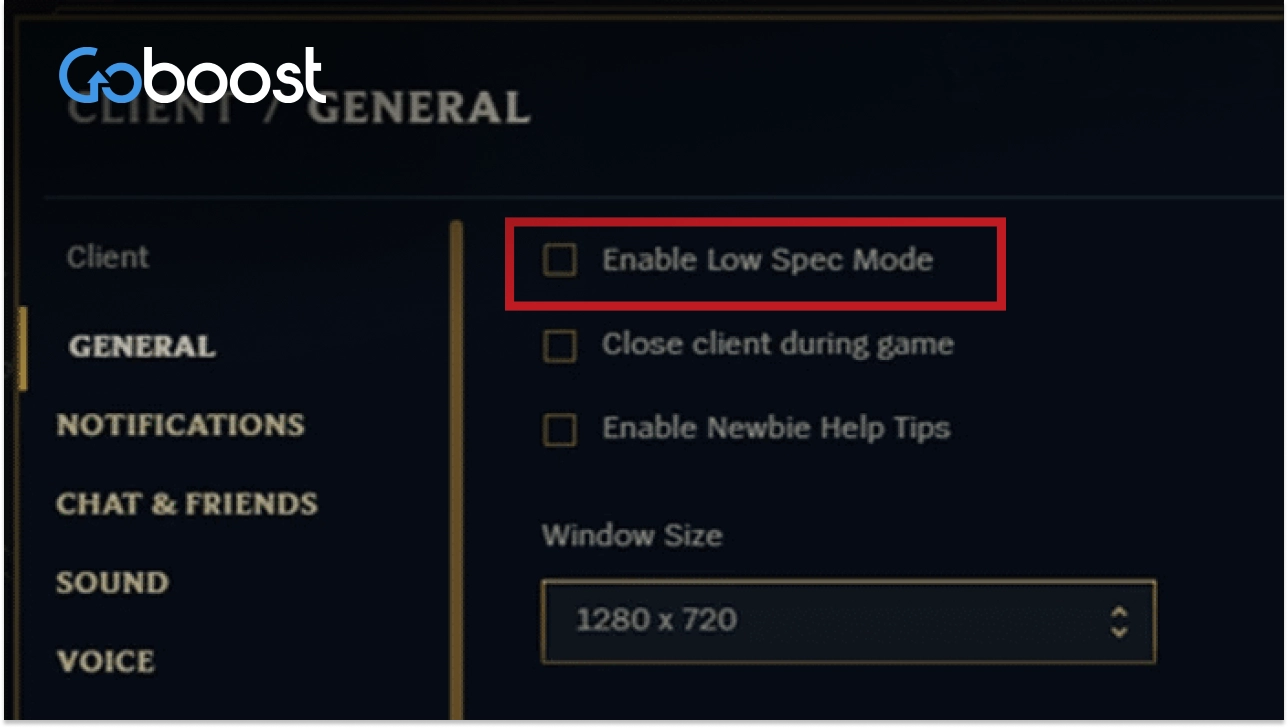
1. Enable “Low Spec Mode” in the Client
The League of Legends client is notoriously resource-heavy because of its animations.
Click the Gear icon (Settings) in the top right corner of the client.
Under the General tab, check the box for Enable Low Spec Mode.
Additionally, check the box for Close client during game. This frees up massive amounts of RAM and CPU power while you are actually playing on the Rift.
2. Optimize Vanguard and Background Apps
The 2026 Vanguard system constantly scans your PC. If it conflicts with an overlay, your FPS will plummet.
Completely disable the Discord Overlay and GeForce Experience Overlay.
Open your Windows Task Manager and close resource-heavy background applications like Google Chrome or animated wallpaper engines before queuing up.
3. In-Game Video Settings for Maximum FPS
If your in-game frames are dropping, prioritize performance over visual quality:
Resolution: Ensure it matches your monitor’s native resolution.
Character/Environment Quality: Set to Medium or Low.
Shadows: Turn this completely OFF. Shadows consume the most graphical processing power in LoL and provide zero competitive advantage.
Frame Rate Cap: Cap your FPS to match your monitor’s refresh rate (e.g., 144 FPS). Uncapped frame rates can cause your GPU to overheat and throttle, causing sudden stuttering.
Dealing with technical issues is incredibly frustrating, especially if they have already ruined your MMR by causing you to disconnect and lose LP. While you are troubleshooting your PC, you don’t have to watch your rank plummet. By setting up a lol rank boosting order, our Challenger professionals can recover your lost LP securely. Whether you choose the solo route to let them fix your MMR or the duo route to play alongside them once your FPS is stable, GoBoost ensures your account stays competitive.
Recover Your Lost LP with GoBoost
Don’t let FPS drops trap you in low elo. Secure your true rank today.
goboost lol rank boosting – Head to our boosting page to reclaim your LP. Choose Solo Queue for a fast rank recovery, or select Duo Queue to team up with our Challenger experts.